Website URL to Video
Paste any product page or website URL and get a fully edited video in seconds.
Provide your URL:
Creating Videos From Web Content Shouldn't Be This Hard
The traditional way of turning website content into videos wastes time, money, and energy. Sound familiar?
Hours of Manual Work
Copy text from your website, write a script, find stock footage, record voice-over, edit everything together. A single video takes 3-5 hours the manual way.
Expensive Freelancers
Hiring a video editor costs $50-$200 per video. Need 10 videos a month for your blog content? That's $500-$2,000 — and days of back-and-forth revisions.
Impossible to Scale
You have dozens of blog posts, product pages, and articles that could be videos. But manually converting each one? Most content never gets repurposed.
With Cliptalk, paste a URL and get a publish-ready video in under 2 minutes. No editing. No freelancers. No wasted content.
AI-Powered URL to Video Converter With Everything Built In
Cliptalk's website to video generator includes auto-captions, AI voice-over, b-roll generation, and a full editor — all from a single URL
Auto-editing
Our AI automatically edits video clips by understanding your prompts and instructions
Auto-captions
Boost video reach with quick, precise captions
AI B-rolls
add b roll footage into your video clips automatically
Natural language editing
Edit your video clips by simply talking to AI
Remove Silences and Filler words
Remove unwanted silences with a single click
Auto-clipping
Use AI to automatically make clips from text prompts
How to Convert a Website URL to Video in 3 Steps
No downloads, no editing skills, no complex software. Just paste a link and let AI do the rest.
1. Paste your website URL
Provide any link — a blog post, landing page, product page, news article, or social post. Cliptalk's AI will automatically crawl and extract the key content from your webpage.
2. AI generates your video automatically
Our AI writes a video script from your page content, generates matching visuals and b-roll footage, adds professional voice-over in 48+ languages, and overlays precise captions — all automatically.
3. Customize, download, and share
Fine-tune your video with Cliptalk's built-in editor. Change voice actors, swap visuals, adjust the script, add music, then export and share directly to YouTube, Instagram, TikTok, or LinkedIn.
Fully customizable video creation
Add styles, Change voice actors, Choose from 48 languages, Add Music and more...
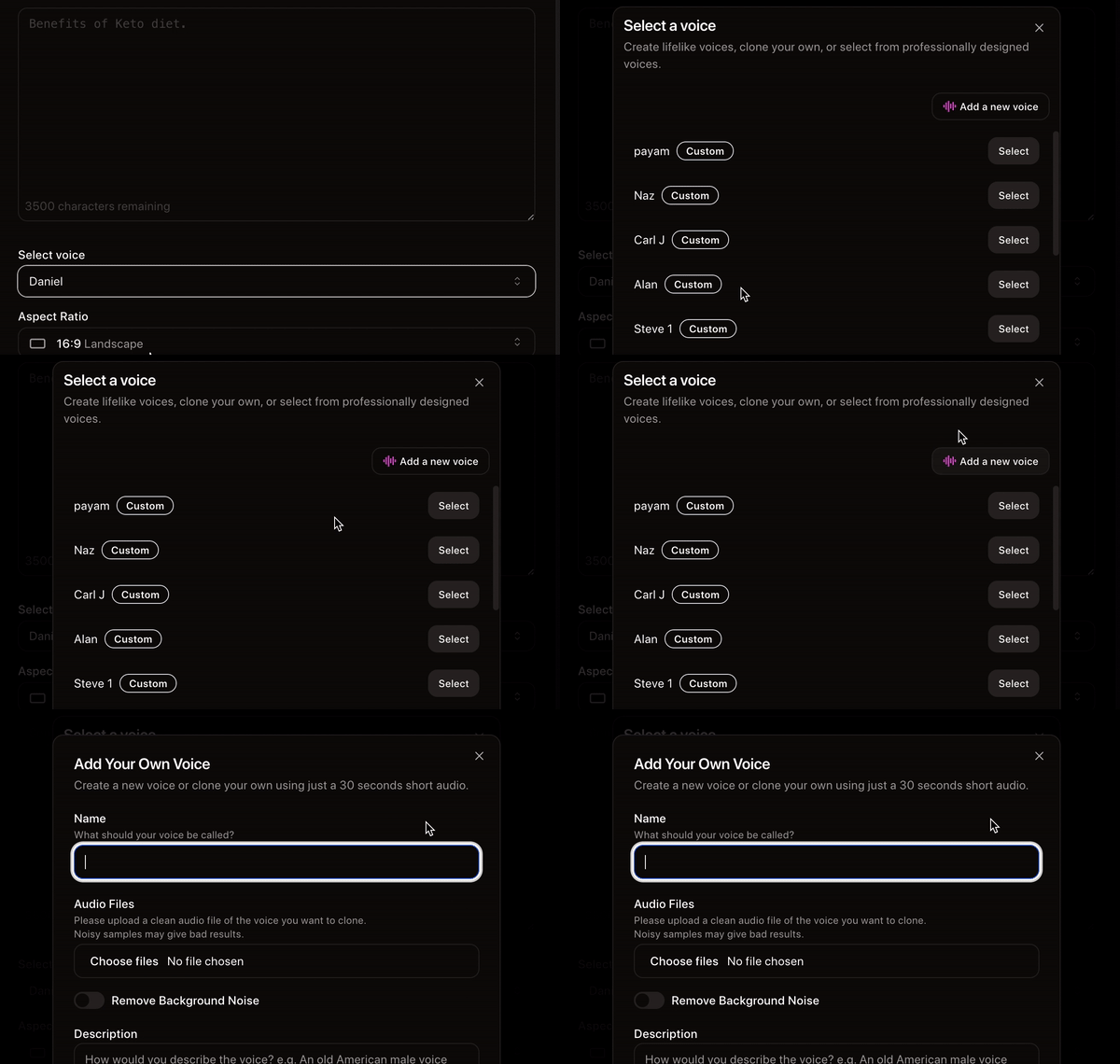
Clone any voice in seconds
Clone a voice with high accuracy using just a short, 30-second speech sample. and use it in your videos.
A simple yet powerful video editor
add your own images, videos, and audio or generate them using the latest AI. have full creative control over your creations.
Who Uses the Website to Video Generator?
Cliptalk's URL to video AI is built for anyone who wants to turn existing web content into engaging videos — fast
Content Creators
Run a faceless YouTube channel, grow on TikTok, or build an Instagram presence. Convert your blog posts and articles into viral videos without filming or editing.
Digital Marketers & Agencies
Repurpose client landing pages, product pages, and blog content into video ads at scale. Generate multiple video variations for A/B testing in minutes instead of weeks.
E-Commerce Brands
Turn your product pages into video ads and product showcases. Paste your Shopify, Amazon, or any product URL and get scroll-stopping videos for TikTok Shop, Instagram, and YouTube.
Bloggers & Publishers
Stop letting your written content sit idle. Convert every blog post into a video that drives traffic back to your website from social media platforms where video dominates.
Create, Edit, and Publish Videos Quickly with AI

AI Voice Actors For Any Emotion
AI-voice characters with realistic voices to express any emotion based on your preferences
Auto Caption and B-roll Generation
Cliptalk will automatically generated Animated Captions, B-roll Footage and Images based on your provided script
Start Creating Videos 10X Faster
Why Choose Cliptalk as Your URL to Video Generator?
48+
Languages Supported
Generate videos with AI voice-over in 48+ languages and accents. Reach global audiences from a single URL.
<2 min
URL to Video
Paste any website link and get a fully edited video with captions, voice-over, and b-roll in under 2 minutes.
Free
To Start
No credit card needed. Convert your first website URL to video for free and see the results before you commit.
Convert Any Web Content Into Engaging Videos
Cliptalk's website to video converter works with any type of webpage. Here are the most popular use cases:
Blog Post to Video
Repurpose your blog articles into videos. Paste your blog URL and AI will summarize key points, create visuals, and add voice-over — perfect for driving traffic from YouTube and TikTok back to your site. Turn every article into a video that works across all social platforms.
Landing Page to Video Ad
Turn your landing page into a promotional video ad. AI extracts your value proposition, features, and CTAs to create a compelling video you can use across social media and paid ads. Perfect for SaaS companies, agencies, and startups.
News Article to Video
Convert news articles and press releases into video summaries. Ideal for news channels, media companies, and content creators who want to cover trending stories quickly and post on YouTube or TikTok.
Product Page to Video Ad
Transform e-commerce product pages into video ads and reviews. AI pulls product details, images, and descriptions to create videos that showcase your products on Instagram Reels, TikTok, and YouTube. Works with Shopify, Amazon, and any e-commerce URL.
Social Media Post to Video
Paste a link to any public social media post — tweets, LinkedIn articles, Reddit threads — and convert them into engaging video content. Great for commentary channels and content curation.
Documentation to Video Tutorial
Turn help docs, knowledge base articles, and how-to guides into video tutorials. Make your documentation accessible and engaging for users who prefer watching over reading.
Website to Video — Frequently Asked Questions
Started my faceless YT channel tuesday and im already at 20k views, only posted shorts from Cliptalk Pro
lyraTV
Youtube Creator
I have been saving hours of time with Cliptalk, before it I had to create short videos manualy doing borinng copy and paste from different AIs now everything is provided so I can just make my videos easily in minutes
Leon
Digital Marketer
The customer service I received was exceptional. The support team went above and beyond to address my concerns. they implemented a new feature in a day just to address my needs.
Marieta Kostova
Marketing coach
I'm running 3 Faceless channels on different niches alone, I could never do it withour help of Cliptalk AI, it's really fast with high quality output
Lantos sar
Content Marketer
Say goodbye to the struggle of creating short form videos for platforms like TikTok, YouTube Shorts, Instagram Reels, because Cliptalk has got you covered.
Tim Timothy
Content Creator
We just discovered @CliptalkAI and honestly I was blown away! I have started turning all of our ideas into videos and posting across all of our social medias and we are getting tons of new traffic to our website now
Younan.edu
Entrepreneur
Explore More AI Video Tools
Cliptalk offers a full suite of AI-powered video creation tools beyond URL to video conversion
AI TikTok Video Maker
Create viral TikTok videos from text prompts with AI-generated visuals, captions, and trending audio.
AI Influencer Video Generator
Generate realistic AI influencer videos for marketing campaigns and social media content.
AI Talking Character
Create animated talking characters powered by AI for engaging video content and presentations.
YouTube Thumbnail Generator
Design click-worthy YouTube thumbnails with AI that boost your video click-through rates.
YouTube Script Generator
Generate engaging YouTube video scripts with AI tailored to your niche and audience.
YouTube Name Generator
Find the perfect YouTube channel name with AI-powered suggestions for your niche.
Ready to Turn Your Website Into Videos?
Join thousands of creators and marketers using Cliptalk to convert web content into engaging videos. Start for free — no credit card needed.